MOD (remainder of a division, Excel method) |
  
|
MOD (remainder of a division, Excel method) |
|
Syntax:
MOD(x, y)
Description:
This returns the remainder of the division of x by y according to the "Excel method".
Important: This function returns FALSE results in some cases (see note below)!
Example:
MOD(5, 3) returns 2
MOD(5, 0) returns a #DIV/0! error value
MOD(5, -3) returns -1 (which is wrong – see below!)
Note:
Microsoft Excel returns incorrect results when you use the MOD function with a negative numerator or denominator.
Calculate also returns incorrect results in this case (for compatibility reasons), but it offers an additional function named MODP that returns correct results
The following table shows the differences between MOD and MODP (the results highlighted in green color are incorrect):
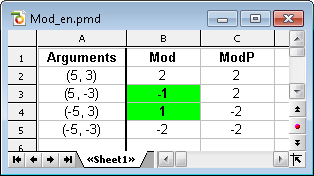
Compatibility notes:
Note: The MODP function is not supported by Microsoft Excel. If you save a document in Excel format, all calculations that use this function will be replaced by their last result as a fixed value.
See also: